Showing posts with label SQL. Show all posts

Wednesday, July 30, 2014

PIVOT Table in MS SQL

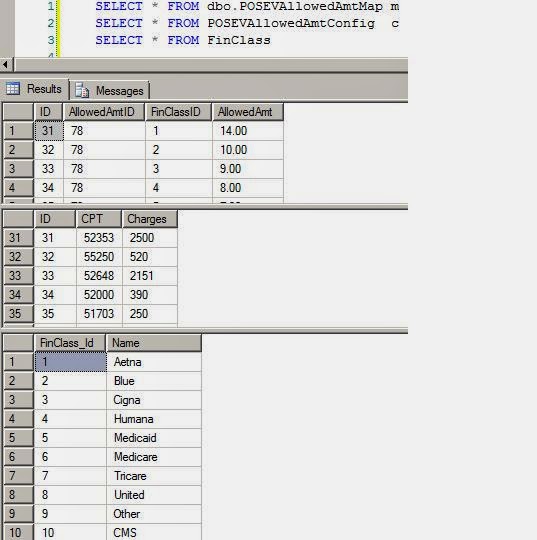
Table Structure


Now Pivot those  Tables like this

WITH AllowedAmount AS (
   SELECT
CAST(round(MAP.AllowedAmt,2) AS NUMERIC(36,2)) AllowedAmt
    ,c.CPT
    ,CAST(round(c.Charges,2) AS NUMERIC(36,2)) Charges
    , F.NAME
   FROM
      dbo.POSEVAllowedAmtMap MAP
      FULL JOIN POSEVAllowedAmtConfig c ON c.ID =MAP.AllowedAmtId
   LEFT OUTER JOIN dbo.finclass F
      ON MAP.FinClassId = F.FinClass_Id
   
)
SELECT *
FROM
   AllowedAmount
   PIVOT (Max(AllowedAmt) FOR NAME
    IN (Aetna,
Blue,
Cigna,
Humana,
Medicaid,
Medicare,
Tricare,
United,
Other,
CMS)) P    


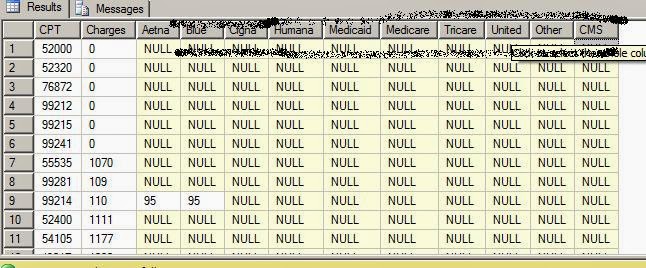
Check Result of PIVOT Query Result


Friday, August 3, 2012

Display table design ( with data types ) with SQL QUERY

Display table design with SQL QUERY 


Execute folowing in SQL Query window

sp_columns <table name>

OR

sp_help  <table name>


Thursday, June 28, 2012

Insert selected records (checkboxes) from asp gridView & perform CRUD operations


Scenario :- I have to perform CRUD operation for selected records ( check boxes) in a GridView  ID as described in the image.


No what we are doing  is to perform a for loop on datatgrid & get selected checkbox id in a string varibale separted by ','.After that we will create a DB function that will split the checkbox ID'd string in new row for each id.


It will make CRUD operation very easy


GridView in aspx:-


  <asp:DataGrid ID="grdList" DataKeyField="diagnosis_id" Runat="server" AutoGenerateColumns="False"
AllowPaging="False" PageSize="100" ShowHeader="true"  >
<Columns>
<asp:BoundColumn DataField="diagnosis_name" HeaderText="DIAGNOSIS" SortExpression="diagnosis_name asc">
<HeaderStyle Width="75%" HorizontalAlign="Center" ></HeaderStyle>
<ItemStyle CssClass="greylabelsmall"></ItemStyle>
</asp:BoundColumn>
</asp:TemplateColumn>
</Columns>
</asp:DataGrid>


VB function to get selected checkboxes in datagrid


 Private Sub GetCheckedBox()
        For Each item As DataGridItem In grdICDList.Items
            If CType(item.FindControl("chkICD"), CheckBox).Checked Then
                icdIds = icdIds + Convert.ToString( grdList .DataKeys.Item(item.ItemIndex)) + ","
            End If
        Next
        If icdIds.Length > 0 Then
            If icdIds.LastIndexOf(",") > 0 Then
                icdIds = icdIds.Substring(0, icdIds.Length - 1)
            End If
            'SaveICDs()
            InsertDiagnosis(icdIds)
        End If
    End Sub


Now create a db Function like this:-


CREATE  FUNCTION [dbo].[Split]      
(      
 @RowData varchar(8000),      
 @SplitOn nvarchar(5)      
)       
RETURNS @RtnValue table      
(      
 Id int identity(1,1),      
 Data nvarchar(100)      
)      
AS       
BEGIN      
 Declare @Cnt int      
 Set @Cnt = 1      
      
 While (Charindex(@SplitOn,@RowData)>0)      
 Begin      
  Insert Into @RtnValue (data)      
  Select      
   Data = ltrim(rtrim(Substring(@RowData,1,Charindex(@SplitOn,@RowData)-1)))      
      
  Set @RowData = Substring(@RowData,Charindex(@SplitOn,@RowData)+1,len(@RowData))      
  Set @Cnt = @Cnt + 1      
 End      
       
 Insert Into @RtnValue (data)      
 Select Data = ltrim(rtrim(@RowData))      
      
 Return      
END 


And Use it in your stored procedures like this :-


                INSERT INTO INSERTABC         
                        (CPTID,   
                         
                         ICDID,   
                         CREATED_USER,         
                         CREATED_DATE,         
                         ISDELETED)         
       SELECT @CPTID,LTRIM(RTRIM(DATA)), @CREATED_USER,  GETDATE(),0   FROM SPLIT(@ICDIDS,','


Example :--


  SELECT DATA  FROM SPLIT(@ICDIDS, ',' )
Data will give you select check boxes ID in new rows.


Wednesday, May 30, 2012

Saving Date Using Microsoft SQL Helper Class


Saving Date Using Microsoft SQL Helper Class
   
First Import  :-   Imports Microsoft.ApplicationBlocks.Data

Private Sub SaveData()
        Dim param(12) As SqlParameter
        param(0) = New SqlParameter("@patient_Id", sCookPatMrn)
        param(1) = New SqlParameter("@eventId", sCookPatVisit)
        param(2) = New SqlParameter("@created_User", sCookPatMrn)
        param(3) = New SqlParameter("@modified_User", sCookPatMrn)
        param(4) = New SqlParameter("@VoidedVol", Int32.Parse(txtVoided.Text))
        param(5) = New SqlParameter("@MaxRate", Int32.Parse(txtMaxRate.Text))
        param(6) = New SqlParameter("@PVR", Int32.Parse(txtPVR.Text))
        param(7) = New SqlParameter("@Sensation", Int32.Parse(txtSensation.Text))
        param(8) = New SqlParameter("@MaxCapacity", Int32.Parse(txtMaxCapacity.Text))
        param(9) = New SqlParameter("@VoidingPressureAvg", Int32.Parse(txtPressureAvg.Text))
        param(10) = New SqlParameter("@VoidingPressureIso", Int32.Parse(txtPressureISO.Text))
        param(11) = New SqlParameter("@id", SqlDbType.Int, 0, ParameterDirection.Output, False, 0, 0, "ID", DataRowVersion.Default, Nothing)
        '' param(12) = New SqlParameter("@masterGroup", "CystoProstate")
      SqlHelper.ExecuteNonQuery(dbconn, CommandType.StoredProcedure, "Put_StoreProcedure_Name", param)
        If (IsDBNull(param(11).Value) = False) Then
            _cystoInstrumId = param(11).Value
        End If

    End Sub
Friday, May 25, 2012

SQL Listing all column names alphabetically


Dynamic Query to list all column Alphabetically.


DECLARE @QUERY VARCHAR(4000)SET @QUERY = 'SELECT '
 SELECT @QUERY = @QUERY + Column_name + ','  + CHAR(13) + CHAR(10)   FROM  INFORMATION_SCHEMA.COLUMNS WHERE TABLE_NAME = N'<TableName>' ORDER BY Column_name   

SET @QUERY = @QUERY + 'FROM  <TableName> '

PRINT @QUERY

Note:- Replace  <TableName> with your table name .Also if you want all fields in a string ( a,b,c,d  etc)  then remove  CHAR(13) + CHAR(10) 


Update :-
 Underscore (_) and quotes within SQL LIKE queries 
Suppose we have a field having data  'xxxx_S'   now We have to select  Table Columns having '_S'


DECLARE @QUERY VARCHAR(4000)
SET @QUERY = 'SELECT '

SELECT @QUERY = @QUERY + Column_name + ','
  FROM  INFORMATION_SCHEMA.COLUMNS
 WHERE TABLE_NAME = N'insuredinfo' AND Column_name LIKE '%' + char(13) + '_S' escape char(13)

   SET @QUERY = @QUERY + 'FROM insuredinfo'
PRINT @QUERY

Monday, December 5, 2011

Test Stored Procedure Manually in MS SQL

Write a stored procedure  eg :  sp_Insert_Client_info

Now on New Query window  execut it with stored procedure's required value,

 like this  sp_Insert_Client_info'Age','India','phone',10101

Above sp will take 3 arguments/values :

  1. Age  or text value
  2. India or Text vale
  3. 10101  or integer value


Another example:

 sp_Insert_Client_Info'Jhon','sharma',87


Tuesday, November 15, 2011

Casting date & time to datetime in SQL

Casting & concatenating date & time field of a table to datetime & perform a datetime search query

Okey its a quick post.We will get date & time separably from C# & we will concatenating in DB as a datetime & perform a search query.


In C# to SQL 
Suppose  variable 1=11/9/2011 10:53:00 AM
V2=11/9/2011 12:42:50

In table we have two fields  like one is date & second is time  .Now we will cast them in to Datetime & search with datetime parameter of C#


--[sp_checkFlights]'11/9/2011 10:53:00 AM','11/9/2011 12:42:50'
ALTER PROCEDURE [dbo].[sp_checkFlights]
(
@gmtnow datetime,
@addedtime datetime
)
AS
BEGIN
SET NOCOUNT ON;

SELECT *
FROM tbl_sms_record
WHERE CONVERT(datetime, Convert(varchar, FlightDate) + ' ' + Convert(varchar(8), SchedularDepartureTime))
BETWEEN @gmtnow AND @addedtime

END

Log in Stored Procedure Best Practice in SQL

Log in Stored Procedure Best Practice


(
@uname varchar(100),
@password varchar(100)
)
As
declare @pass varchar(100)
select @pass=password from tbl_user where user_name=@uname
if(@pass=@password)
begin
select user_id,role,type from tbl_user where user_name=@uname and password=@pass
end
else
begin
select 0 as user_id
end

Tuesday, August 9, 2011

If - Else in T-SQL

Its an example of a simple stored procedure using IF-Else in SQL .

First of all,we declared a variable ( @cnt ) to count no of rows that matches the condition ( @cnt=COUNT(*) ).

Select @cnt=COUNT(*) from tbl_X where AirlineCode = @AirlinesCode AND DestinationCode = @DestinationCode


Structure of IF Else like this :-

IF @cnt=0
Then
Insert New Record
Else
Update the Existing Record


Stored Procedure would be :-


USE [XXX]
GO


Create PROCEDURE [dbo].[sp_Admin_InsertIncreasedFare]


@AirlinesCode varchar(100),
@DestinationCode varchar(100),
@Amount decimal(18, 2)


AS
BEGIN

SET NOCOUNT ON;

declare @cnt int=0;

Select @cnt=COUNT(*) from tbl_X where AirlineCode = @AirlinesCode AND DestinationCode = @DestinationCode

-- If loop--
IF @cnt=0

Begin

Insert into tbl_X (AirlineCode,DestinationCode,Amount) VALUES (@AirlinesCode,@DestinationCode,@Amount)

END

Else

Begin

Update tbl_X Set Amount=@Amount where AirlineCode = @AirlinesCode AND DestinationCode = @DestinationCode

END

END